
Cheap VPS But Powerful?
For a long time, I believed the same thing most people do:
cheap VPS equals weak performance.
But after working with different servers, hosting setups, and real workloads, I’ve learned that this assumption is simply wrong.
A VPS doesn’t become powerful because of its price tag.
It becomes powerful because of how the server is built, allocated, and maintained.
If you understand what actually matters under the hood, you can get excellent performance at a very reasonable cost without overpaying for specs you don’t need.
In this post, I want to break down how I evaluate a cheap VPS, what specs I personally look for, and why some low cost servers perform far better than others.
VPS Basics (Why VPS Is the Turning Point)
Before diving into specs, it’s important to understand why VPS hosting is different.

- Shared Hosting → Many users fight for the same resources
- VPS → One physical server is split into isolated virtual machines
- Dedicated Server → One entire machine for one user
The key difference is resource isolation.
With a VPS, even on a budget plan, your CPU, RAM, and storage are reserved for you. You’re no longer affected by random traffic spikes from other users on the same server.
In my experience, this is why VPS hosting is often the first “serious” upgrade people make after shared hosting starts to feel slow or unreliable.
What Makes a Cheap VPS Actually Powerful?
1. NVMe SSD Storage (Non Negotiable for Me)
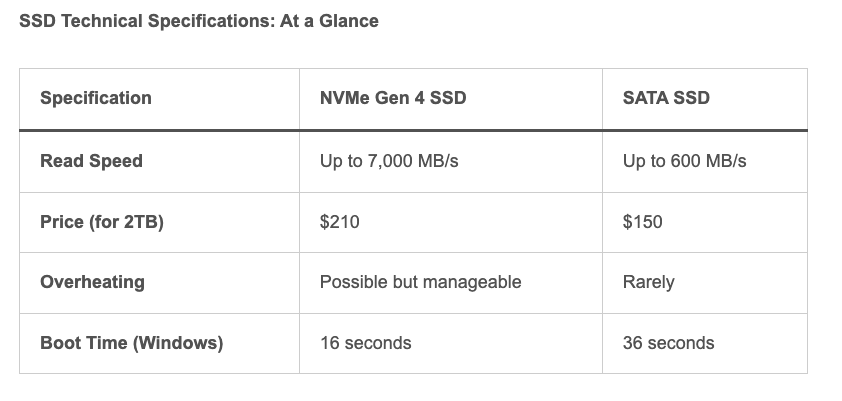
Storage speed affects almost everything:
- Page load times
- Database queries
- Deployments and updates
- Backup and restore operations
NVMe SSD is dramatically faster than HDD or even SATA SSD.
I’ve seen low spec VPS plans feel surprisingly fast simply because disk I/O was no longer the bottleneck.
Personally, if a cheap VPS doesn’t use NVMe, I don’t even consider it anymore.
👉 Storage is one of the easiest places to gain performance without paying much more.
2. Dedicated CPU Core (Not “Shared Burstable”)

CPU allocation is where many budget VPS plans quietly cut corners.
- Shared CPU → Performance drops when neighbors spike usage
- Dedicated CPU → Predictable, stable performance
From my experience, one dedicated core is often enough for:
- Small websites
- Automation bots
- APIs
- Staging or test environments
I’d rather have one guaranteed core than multiple burstable ones that slow down under load. Stability matters more than headline numbers.
3. Reliable Uptime (99.9% or Higher)
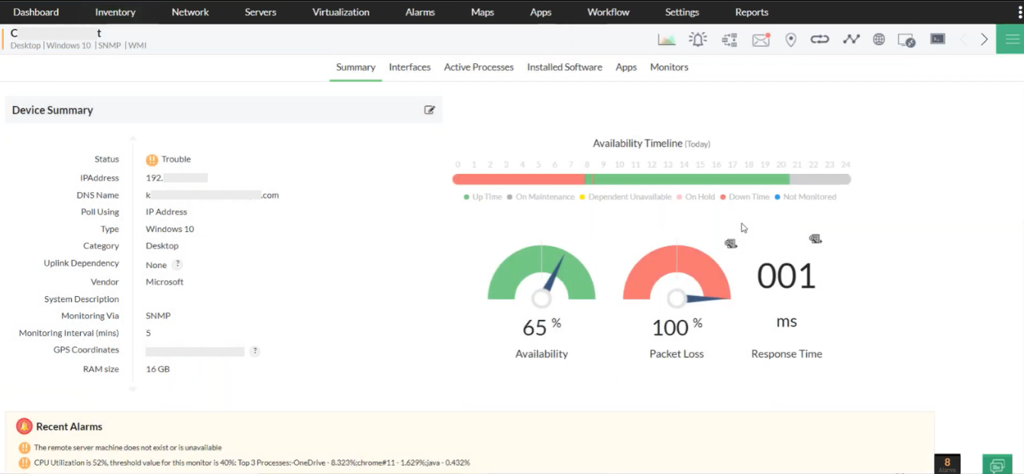
A cheap VPS is completely useless if it’s offline.
Uptime directly impacts:
- SEO rankings
- Customer trust
- Automation workflows
- Monitoring and alert noise
When I evaluate a provider, I look for signs of:
- Redundant power
- Stable networking
- Proper monitoring and maintenance
From experience, cheap and unreliable ends up costing more in downtime, stress, and eventually migration.
How a VPS Actually Works (Why It’s Stable)

At a technical level, a VPS works because of virtualization.
A physical server is split so that:
- CPU cores are allocated
- RAM is reserved
- Storage is isolated
This is why your VPS doesn’t suddenly slow down just because someone else on the same machine is busy.
That isolation is what turns a budget VPS into something I’m comfortable running real services on.
Who I Think Should Use a Cheap but Powerful VPS
When chosen correctly, a low-cost VPS is perfect for:
- WordPress or CMS sites
- Small ecommerce stores
- Automation bots
- API backends
- Dev or staging environments
- Side projects that still need uptime
You don’t need a dedicated server to get professional-level results.
You just need the right VPS fundamentals.
Who Should Use a Cheap but Powerful VPS?
A properly chosen VPS works well for:
- WordPress or CMS sites
- Small ecommerce stores
- Automation bots
- API backends
- Dev / staging environments
- Side projects that need uptime
You don’t need a dedicated server to get professional results.
Turning Knowledge Into a Smarter Choice
Once you understand:
- Why NVMe matters
- Why dedicated CPU matters
- Why uptime matters
Choosing a VPS becomes much easier.
You stop chasing the lowest price, and start thinking in terms of value per dollar.
That’s where providers like RAKsmart naturally come into the picture for me.
Their VPS plans focus on the basics I actually care about:
- Modern NVMe storage
- Proper CPU allocation
- Stable global infrastructure
Those fundamentals are what separate a “cheap VPS” from one I’d actually trust to run workloads on.
Final Thoughts
Cheap VPS does not mean bad VPS.
When you choose correctly:
- You save money
- You get predictable performance
- You avoid upgrading too early
That’s why I’ve seen so many users move from shared hosting and start with RAKsmart when they want affordable VPS performance without unnecessary complexity.
👉 Choose smart, not just cheap.
RAKSmart – High-Performance VPS: Blazing-Fast, Stable Virtualization Solutions.